Introducing Practice Master

Frictionless self-recording for music practice

Features

Practice Master helps you self-record your playing to practice more effectively.


Enter a state of flow with a fast play-listen feedback loop, without the need to do anything other than playing your instrument and listening to what you just played right afterwards.


Take all the friction out of self-recording with hands-free operation and voice commands. There is no more need to put away your instrument to press any buttons!


Get immediate feedback on how you sound and learn to hear the music you create the way your audience does.


Save your best clips to share them or track progress over time.


Use the hands-free, voice-operated metronome and tuner to avoid the need to switch to a different app for those functions.


Fine tune the app to your needs by adjusting several settings.


Benefits

Use self-recording to become a better musician without having to practice more.


Sharpen you musicianship by hearing all aspects of your music, not just whatever you are paying attention to while playing. For example, while working on your dynamics, you might fail to notice that your intonation took a turn for the worse, but the recording will make it obvious.


Listening to a recording prevents any distorted perception caused by being distracted by the mechanics of playing the instrument. Also, a musical instrument typically sounds very different from the player's position than further away like the audience perceives.


Make progress faster by assessing more quickly and accurately which changes to the way you play are beneficial and which aren't.


Make lessons more effective by sharing recording clips with your teacher. Whatever she tells you will make a lot more sense now that you can hear the same version of your music that she does.


Become more objective about your skill and asses progress more accurately by comparing past and present recordings.


Fight performance anxiety by getting used to "performing". Knowing that you are being recorded while you practice gives you a very similar, albeit much less intense, feeling of stress and fear of making a mistake.


How it Works

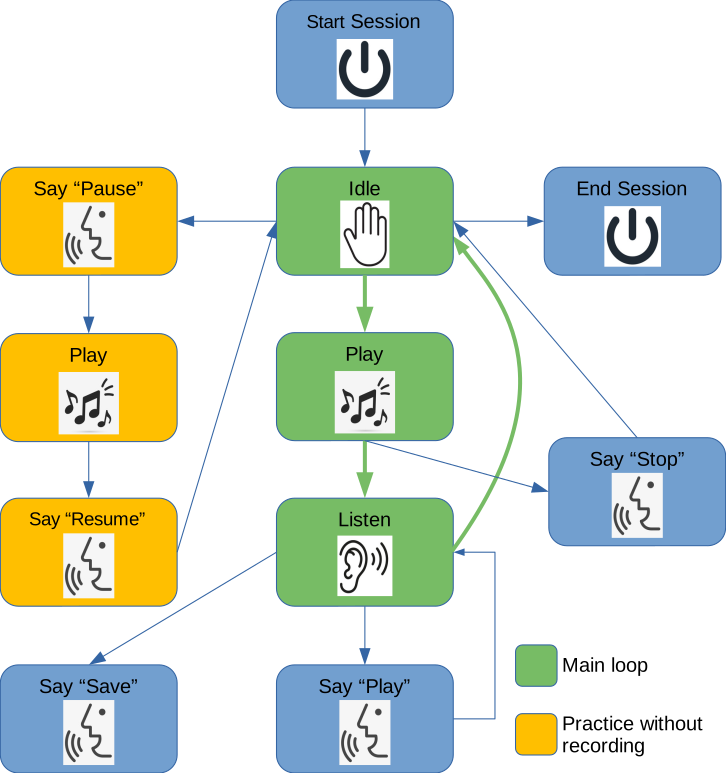
The idea is to play a short music segment and immediately hear the recording back, paying closed attention to anything that could be improved. The process is then repeated, ad infinitum.

  • When working on something new or far from being in a performable state, the recording process can be paused and resumed later once the music gets in better shape.
  • When listening to a recording, playback can be stopped immediately at any time to avoid having to wait for the entire clip to be played.
  • It is possible to play back a recording several times, and also save it to disk for future reference.

  • Frequently Asked Questions

    I already have a recorder app or device, why do I need this?

    Most recording apps and devices are designed with manual operation in mind. Practice Master is designed specifically to do lots of short recordings while practicing to get instant feedback on how you are doing. Its hands-free operation removes most of the friction involved in doing very frequent recordings using a typical recorder app or device.

    How much does it cost?

    Practice Master is free. Premium paid features might be added in the future, but the core product will remain free forever.

    What equipment do I need?

    You need a computer (Windows, Mac or Linux) equipped with a microphone and speakers and running the Chrome browser. Other platforms and browsers might work but are not tested.

    While they are not required, high quality external microphone and speakers will provide the best results.

    My question is not answered here

    Please send us your question directly.


    Get in touch

    If you have any comments or questions please send us feedback.